Showing posts with label roaming. Show all posts

Tuesday, February 8, 2011

Lotus Notes 8.5.2 Roaming - No prompt to upgrade

Last week I hit an issue of a user not getting the prompt for roaming user upgrade. I've down graded roaming, then re-setup roaming but still the user didn't receive the prompt. The adminp process only shows

Update Roaming User State in Person Record
       (Green Checkmark) Server/Test performed action on: 02/01/2011 8:00 PM

Which the document link shows In Progress and an hourglass next to the person document. The person logs into a different computer almost every time. So the issue must reside either in the person document or mail file right?

Well I ended up creating a new person document for the user by clicking "Add Person" and copying and pasting all the data from the old person document to the newly created one. Before I saved the newly created document I deleted the old one ( also I copied and pasted into a temp nab on my machine just in case ) and hit save and close on the newly created person document. The idea being a setting or field that is not displayed in the form is preventing the user from upgrading. The next day I still had issues with the user not getting prompted.

Finally I checked the local log.nsf of the user and found this error message:

Unable to get roaming upgrade lock, exiting roaming upgrade


When I Google searched for that error, I found one link to the forum that someone else had a similar issue and they had the notes.ini parameter client_clock=1 enabled on their client. Fortunately this person posted all the code because I noticed a line saying:

Preseting path to roaming lock db to CN=BELEUMAIL02/O=VWRI!!mail\lsteenho
Entering GetUpgradeLock()
Using Mail file as lock db
Using preset value CN=BELEUMAIL02/O=VWRI!!mail\lsteenho, as the mail file path
Path to the lock DB = CN=BELEUMAIL02/O=VWRI!!mail\lsteenho
Roaming lock already exists
03/11/2009 14:15:32 Unable to get roaming upgrade lock, exiting roaming upgrade.

So I re-created the mail file by doing File > Database / Application > New Copy on the server. Then moved the current mail file outside the data folder and renamed the new copy the same as the moved mail file. A few days later the user received the roaming upgrade prompt! The only downside is the user has to reset their unread marks. If that didn't work I thought about creating a new blank mail file just to get them to upgrade roaming and then revert to the old mail file ( not sure if this would work though ).

I then checked the last thread in the forum and the user basically said the same process fixed his issue too. DOH! Maybe next time I will read the entire thread and save my self the headache!

I sure would like to know if a profile document or regular document is created for this lock. I've tried to 'break' roaming to re-create this but with no success. I am interested if anyone else can shed some light on this roaming upgrade lock process.


References:

Subject: Roaming In Progress, not completing

Thursday, October 14, 2010

the workspace page cannot be used for database icons error

Recently someone ran into an issue with their Lotus Notes client ( 8.5.1 FP1 ) showing an error after login:
update:please read the last paragraph 08/22/2012
"the workspace page cannot be used for database icons"

We just upgraded this person to roaming and after a client restart this error kept showing up. So as a troubleshooting measure (and a process of elimination in which we renamed names.nsf, bookmarks.nsf to .000 extension, launched notes, a message about roaming the workspace popped up and out of the three options I choose the middle one, basically saying to ask me later. Then the notes client errored out saying it cannot find names.nsf. Lotus Note closed and then we renamed names.000 back to names.nsf  ) we renamed the bookmarks.nsf to bookmarks.000 in the person's machine and Lotus Notes launched with out that error. However the new bookmark file does not have the same replica id as the one on the server and it did not pull down the bookmark.nsf from the server.

So we created a new replica of the bookmark.nsf from the roaming\ folder on the server to the local machine in hopes that the existing bookmarks.nsf was corrupted. We closed Lotus Notes, swapped the current booksmarks.nsf with the one replica made from the server and sure enough that fixed it.

After getting this issue over and over, I found a notes.ini parameter for the Lotus Notes client that prevents the client from roaming the workspace. This also fixed my issue without having to delete or restore my bookmarks.nsf ( however, the issue still exists, and will come back when you configure a new client minus this notes.ini parameter). Try using this notes.ini parameter on you workstation to prevent this error from happening again. Also, this notes.ini parameter was introduced in 8.5.1 and it clears your workspace and your view settings:

DISABLE_WORKSPACE_ROAMING=1

good luck :)

reference

LO62488: "THIS WORKSPACE PAGE CAN NOT BE USED FOR DATABASE ICONS"


http://www-01.ibm.com/support/docview.wss?uid=swg1LO62488

Friday, October 8, 2010

Roaming user and lotus notes 8.5.2 problems

Something is not right with the 8.5.2 client and roaming. Here is the scenario:

I have a user that has a desktop pc and a laptop. At this point neither names.nsf or bookmark.nsf have the same replica ID. So I go to upgrade the user to use roaming with the admin client. Next I get a pop up on the desktop pc:

Note: I've noticed that you can only have one client open at a time to see the roaming user message.


So I click 'Ok' to Convert to roaming now. I get the following screen:


After the roaming upgrade process is finished and the databases have been replicated to the server I log out of the Lotus Notes client on the pc. Next I go to the laptop and sign in and I get the following message:


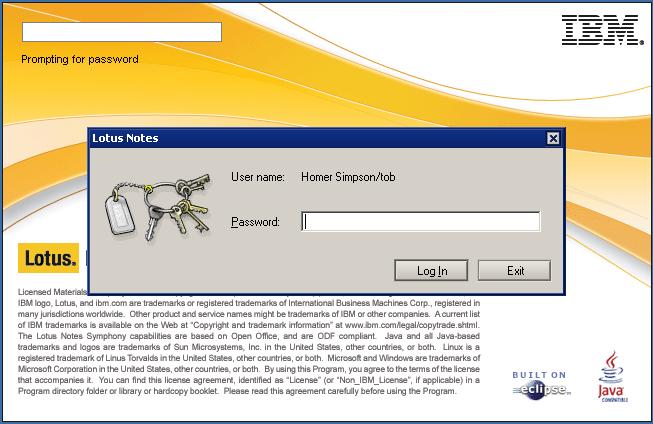
I click ok and Lotus Notes shuts down. Then Lotus Notes automatically starts again and prompts me for the password:


However there is something different about this login screen. Notice there is no drop down for location and id. So before I input my password I checked the data folder:

Notice the highlighted files with the .000 extensions. The names.nsf doesn't exist at this point. So I go back to my login screen and type my password and I get this:

At this point my notes client cannot see my server and it makes sense. In my DNS I do not have an entry for 'Traveler01' and the names.nsf is renamed to names.000 so the connection document will not work. So click 'No' to the prompt above. There are two ways to get around this.

1. Enter the domino server name ( in this case traveler01 ) in DNS and point it to your Lotus Domino server IP. Lotus Notes will always check that first part of the domino server name first in DNS ( this is also the reason why when Lotus Notes is configured and you do not have a connection document for your domino server, this is already configured in DNS ). So if you domino name is test123/test/US, the DNS record needs to be test123.

2. Use the hosts file to temporarily add this entry and remove it after it is done.

Lets go with option 2. So on most XP and Vista ( and Windows 7? ) machines the hosts file is contain under
C:\Windows\System32\Drivers\etc\hosts

The hosts file does not have an extension. Also if you have user access control security turned on ( Vista and Windows 7 only ), you must Launch notepad using 'run as administrator'


to be able to open, edit, and save the file. Otherwise when you go to save the file, it will ask you where to save as. So add a new line to the hosts file, with the syntax of 'IP [tab] name'. So since my domino server name is 'traveler01/tob', and my traveler01/tob ip is 10.1.1.12, I need to make an entry for '10.1.1.12          traveler01' like so


Now launch Lotus Notes again it will work:


Also check out the data folder after the roaming configuration:

Notice the new .nsf files appended on the end. The original .nsf files are now .000 files can be renamed to .nsf if you need to access them at another time. Next choose the location from the names.nsf pulled from the server:

Last and most importantly remove the entry for the traveler01 server from the hosts file and save.


I hope IBM decides to cache the connection document in future releases. Here is a good website for troubleshooting roaming issues:

http://www-01.ibm.com/support/docview.wss?rs=899&uid=swg21424754