Last Thursday I was accepted for Google's App inventor for Android Beta. It is a visual programming language designed to create applications on the Android platform. To sign up for the Beta go to:
http://appinventor.googlelabs.com/about/
and click on the complete "this form":
https://services.google.com/fb/forms/appinventorinterest/
It took me little over a week to be accepted. However Google did not notify me, I just visited the website ( http://appinventor.googlelabs.com/about/ ) every day and click on 'My Projects' until I stopped seeing the signup form.
The visual programming has a learning curve to it but after that it is pretty cool. However I have issues with the activityStarter and textToSpeech modules crashing on my Evo and G1. Heads up, to run your programs you will need to download and unzip the Android SDK and locate the adb.exe program. Also you will need to install the HTC sync software so that the Evo device ( actually all you need is the HTC driver, you can uninstall the HTC software ) will run the programs.
Evo HTC sync:
http://www.htc.com/us/support/evo-sprint/downloads/
Showing posts with label beta. Show all posts
Showing posts with label beta. Show all posts
Monday, October 18, 2010

Thursday, October 7, 2010
Android traveler code drop 1 behavior
The Android traveler code drop 1 is a really great piece of software. However here are a list of annoyances that I have found:
1. When an email is read and moved to a folder on a pc, the new email notification will still display in the notification bar of the Android device. Attempting to open the email from the notification bar doesn't open anything and the email notification in the notification bar doesn't go away. The only way to get ride of it without having to reboot is to open the Traveler mail application.
2. The name lookup cannot find group names
3. When sending a message from the Traveler device, I cannot determine if a message sent correctly because you cannot see the sent folder from Traveler. If the email address is not correct, the Traveler client still says it sent the message.
4. Calendar alerts do not display a notification in the device.
That is it for now, I will be updating this post when I find more.
1. When an email is read and moved to a folder on a pc, the new email notification will still display in the notification bar of the Android device. Attempting to open the email from the notification bar doesn't open anything and the email notification in the notification bar doesn't go away. The only way to get ride of it without having to reboot is to open the Traveler mail application.
2. The name lookup cannot find group names
3. When sending a message from the Traveler device, I cannot determine if a message sent correctly because you cannot see the sent folder from Traveler. If the email address is not correct, the Traveler client still says it sent the message.
4. Calendar alerts do not display a notification in the device.
That is it for now, I will be updating this post when I find more.
Tuesday, October 5, 2010
Using Android traveler beta on Lotus Domino release 8.5.2
First thing is first, do not use this in a production environment, use a test environment. Also, I cannot vouch for the stability of your Lotus Domino / Traveler environment while using the Android Traveler beta program. Now on with the instructions:
Next append the text in versioninfoex.txt to versioninfo.txt file under /traveler/cfg/client/.


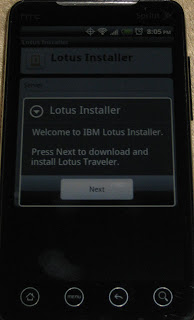


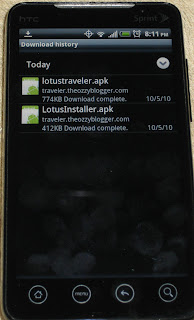


First, install Lotus Domino 8.5.2 and configure the server ( consider using 'More name variations with lower security' on the traveler server, I ran into some issues logging in using 'Fewer name variations with higher security'). Next install traveler 8.5.2. Next shut down Lotus Domino and install the Android traveler beta ( I am using code drop 1 ) by unpacking the files and copying them to the correct location according to the readme.txt:
The following files are copied from the zip to the domino server:
readme.txt
domino/html/traveler/LotusInstaller/LotusInstall.apk
domino/html/traveler/LotusTraveler/android/LotusTraveler.apk
traveler/cfg/client/VersionInfoExt.txt
Next append the text in versioninfoex.txt to versioninfo.txt file under /traveler/cfg/client/.
Start Lotus Domino.
First we need to download the Lotus Installer software on the Android device.
Note: traveler.theozzyblogger.com url will not work because I used it as an internal server and domain.
Go to the browser and type http://servername.com/servlet/traveler
Next Click on 'Configure your Android'

Next click on 'Menu' -> 'More' -> Downloads


Click on the LotusInstaller.apk to launch

If you do not have allow installation of application from unknown sources, you will get the following screen. Click Ok

Next check the Unknown sources and click ok to the popup message


Now go back to the downloads page and click on the LotusInstaller.apk again

Next click Install

Then you will see the Application installed. Click 'Open'

On the next screen, click 'Agree'

Next click 'Next'

Next input the traveler server name and user name and password and click 'Next'

Next there is a screen that says 'preparing to download'

However, this will never complete and the android traveler install will never download. So to get around this you have to hit the back button and open the browser and launch the apk installer from the browser url to download it. The url is:
http://servername.com/traveler/LotusTraveler/android/LotusTraveler.apk

Once downloaded, click on 'Menu' -> 'More' -> 'Downloads'. Next click on LotusTraveler.apk to install.

Click 'Install'

Click 'Open'

Input the user name, password, and traveler server name ( I had an issue with user name ozzy blogger, the keyboard does not allow a space but puts an underscore. I had to change the server security to more name variations and used the short name ozzyblogger ) Click 'Next'

Since I do not want my contact from Lotus Notes to be added to my phone, I uncheck Sync Contacts. Click 'Finish'

Click 'Ok'
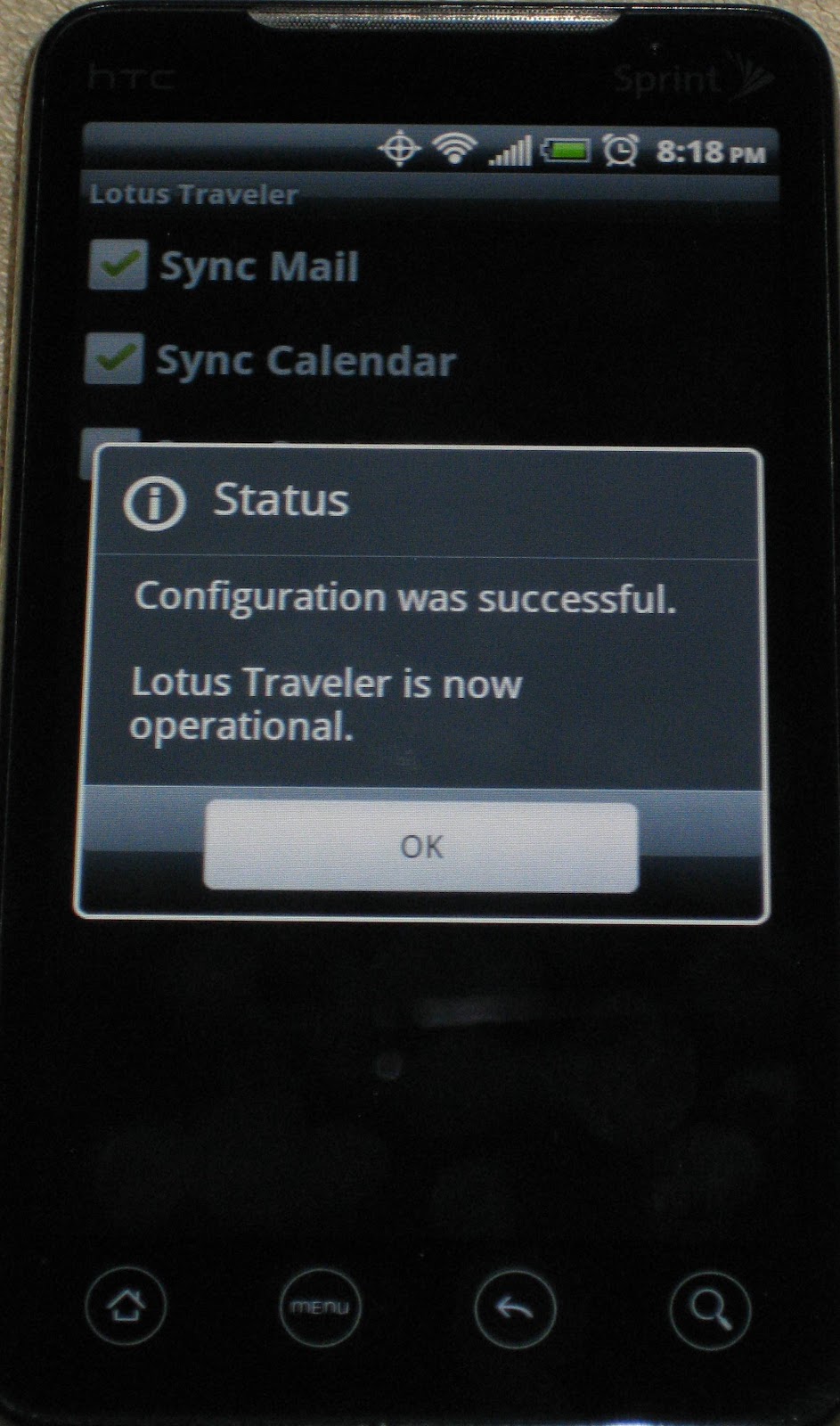
And that is it, the android beta traveler is running on Lotus Domino 8.5.2.
Tuesday, August 3, 2010
Lotus Traveler for 8.5.2 beta - update
So far I have been pleased with the traveler beta for Android. About once a week I receive an exception error and traveler will close unexpectedly but a restart of the phone fixes it. Other issues I have found:
1. Sometimes an email will be stuck in the notification bar even after I've selected it and viewed it. restart fixes this
2. Unread marks do not always sync as fast I want them to. Read messages on traveler take some time to reflect read on my notes client
3. Still see some phantom contact syncing, it's not consistent, but I have this turned off and I should not have Lotus Notes contacts in my phone. There might be a residual issue with my first traveler install and contact syncing was turned on
4. The download button that will download a full message ( you can set traveler to only download a specific size of the message or a truncated message ) doesn't aways work. Seems to work very well with only text emails
5. I wish they would use tables to prevent some emails from scrolling way off the right side of the screen. It's hard to read an email that you have to scroll to the right to read.
6. So far no issues with Android Froyo 2.2 release and my version of traveler beta.
Things I love about Android traveler is the fast sync when a new message comes in. The notifications of unread email is very accurate.
According to Ed Brill, the Android release of Traveler will not make the 8.5.2 release :(
http://www.edbrill.com/ebrill/edbrill.nsf/dx/lotus-notes-traveler-for-android-beta-some-clarifications
1. Sometimes an email will be stuck in the notification bar even after I've selected it and viewed it. restart fixes this
2. Unread marks do not always sync as fast I want them to. Read messages on traveler take some time to reflect read on my notes client
3. Still see some phantom contact syncing, it's not consistent, but I have this turned off and I should not have Lotus Notes contacts in my phone. There might be a residual issue with my first traveler install and contact syncing was turned on
4. The download button that will download a full message ( you can set traveler to only download a specific size of the message or a truncated message ) doesn't aways work. Seems to work very well with only text emails
5. I wish they would use tables to prevent some emails from scrolling way off the right side of the screen. It's hard to read an email that you have to scroll to the right to read.
6. So far no issues with Android Froyo 2.2 release and my version of traveler beta.
Things I love about Android traveler is the fast sync when a new message comes in. The notifications of unread email is very accurate.
According to Ed Brill, the Android release of Traveler will not make the 8.5.2 release :(
http://www.edbrill.com/ebrill/edbrill.nsf/dx/lotus-notes-traveler-for-android-beta-some-clarifications
Wednesday, July 21, 2010
Traveler for Android ( 8.5.2 beta ) - Update
I installed the Traveler Android beta client again on Saturday night and I haven't had issues with it. I think the issue might have been me terminating the app using a task killer app but I don't know. In viewing the log it is connecting to the server about every 10 minutes.
Friday, July 16, 2010
Traveler for Android ( 8.5.2 beta ) - Update
Today I noticed that my phone didn't charge completely over night and it was warm to the touch all day. After loading OS Mon I found the Traveler task using 70% of the cpu! I think something got corrupted because I stopped receiving email alerts through Traveler. I checked the log and it seems that traveler was checking the server every few seconds ( not sure if this is normal ) I uninstalled the traveler app and installer and it is back to normal. I will re-install on Monday.
Subscribe to:
Posts (Atom)