Yesterday I tried to move 6 sub folders to make them root folders. Using my Lotus Notes client, I clicked and dragged them to the root. Then I noticed that the folders did not change on my Android Traveler "show folders" option. I didn't think much about it and went ahead and subscribed to those 6 root folders that were showing as sub folders in Traveler. Next thing I know I get a security execution alert when opening them in my Lotus Notes client and it is signed by my traveler server! After closing my notes and re-opening I found that my traveler server moved my root folders back to sub folders!
This actually makes some sense to me ( well not the moving of the folders back to sub folders ) but each folder is a design element with a unique ID. So when those folders are moved Traveler must not have the ability to recognize it ( at least in the 8.5.2.1 version ). I'm going to try and upgrade to 8.5.2.2 and see if the issue still exists.
As a work around I just created new folders and moved all my mail over and deleted the old folders.
Showing posts with label lotus traveler. Show all posts
Showing posts with label lotus traveler. Show all posts
Monday, June 27, 2011

Saturday, February 12, 2011
Lotus Traveler 8.5.1 issue with iPhone / iPad
Ran into an issue with setting up an iPhone account with Lotus Traveler. When the Logon Name and Mail Address was filled out and the 'Generate' button was clicked, an error message on the web page would display in red color:
An error was encountered trying to read file c:\lotus\domino\data\traveler\cfg\client\Apple.xml.
In this instance the server was a partition server and the second partition is not running. The data\traveler\cfg folder did not contain a \client\ folder. However on the second partition located at c:\lotus\domino\data2\ had a \client\ folder with the AppleTemplate.xml file.
First I stopped the traveler task
tell nTraveler quit
Then copied the \client\ folder from c:\lotus\domino\data2\traveler\cfg\ to c:\lotus\domino\data\traveler\cfg\ folder. Then I started the traveler task
load traveler
When the task was finished loading the Apple.xml file was created from the AppleTemplate.xml in the correct folder c:\lotus\domino\data\traveler\cfg\client\Apple.xml
More info:
Customizing the device configuration process for Apple
http://publib.boulder.ibm.com/infocenter/domhelp/v8r0/index.jsp?topic=/com.ibm.help.lnt851.doc/Creating_the_bootstrap_file_for_Apple.html
An error was encountered trying to read file c:\lotus\domino\data\traveler\cfg\client\Apple.xml.
In this instance the server was a partition server and the second partition is not running. The data\traveler\cfg folder did not contain a \client\ folder. However on the second partition located at c:\lotus\domino\data2\ had a \client\ folder with the AppleTemplate.xml file.
First I stopped the traveler task
tell nTraveler quit
Then copied the \client\ folder from c:\lotus\domino\data2\traveler\cfg\ to c:\lotus\domino\data\traveler\cfg\ folder. Then I started the traveler task
load traveler
When the task was finished loading the Apple.xml file was created from the AppleTemplate.xml in the correct folder c:\lotus\domino\data\traveler\cfg\client\Apple.xml
More info:
Customizing the device configuration process for Apple
http://publib.boulder.ibm.com/infocenter/domhelp/v8r0/index.jsp?topic=/com.ibm.help.lnt851.doc/Creating_the_bootstrap_file_for_Apple.html
Tuesday, February 1, 2011
Lotus Traveler 8.5.2.1 SSL and uninstalling issues
I've had two major issues with Lotus Notes Traveler recently ( only applies to version 8.5.2.1 ):
1. Uninstalling the Lotus Mobile Installer goes through ok but uninstalling Lotus Notes Traveler yields "Uninstall not successful". I've had some what 80% success installing Lotus Notes Traveler on top of the old version but in other cases I had to wipe the phone. I found a technote regarding this issue with uninstalling Lotus Notes Traveler. Before you uninstall go to your home screen and press Menu/Options > Settings. Next open Security / Location & Security. Next find 'Select Device Administrators' and open it. You should see "Lotus Traveler Security" checked. Uncheck this and you will be able to uninstall. I've included a link at the bottom.
2. Using SSL. I tell you what, I've had strange issues but fortunately they are all documented and addressed.
SSL issue # 1. Self signed certificate doesn't allow you to download the Lotus Mobile Installer from the web browser. This issue seems to be related to the Android browser and self signed certificates. See the link for workarounds. FYI the self signed SSL certificate works great with Lotus Notes Traveler besides this issue.
SSL issue # 2. Signed SSL certificate causes communication between Android devices and server to stop communicating. I had a self signed certificate and I moved the server to a wild card commercially signed certificate. Some communication worked but over the next couple of days all the devices stopped working / alerting when new mail arrived. After re-installing the Lotus Mobile Installer, it prompts me to download the Lotus Notes Traveler and then gives me an error. This is an issue with a / in the ou or organizational unit of the certificate. The fix is to grab the new LotusInstaller.apk and LotusTraveler.apk files from fix central and copy them to the server overwriting the old versions and change the VersionInfo.txt to reflect the new versions. The bad thing is that you have to re-install both installer and traveler on all devices.
Problem downloading and installing the Lotus Mobile Installer for Android devices
http://www-01.ibm.com/support/docview.wss?uid=swg21457494
Traveler 8.5.2.1 APAR affecting Android SSL users (includes well-known certificates)
http://www-01.ibm.com/support/docview.wss?uid=swg21458224
Recommended Maintenance - Lotus Notes Traveler
http://www-01.ibm.com/support/docview.wss?uid=swg24019529
8.5.2.1 APAR LO57088 for Android (Fix 1 for install post 8.5.2.1)
Fix central - LNT_Android_8521_FIX1
1. Uninstalling the Lotus Mobile Installer goes through ok but uninstalling Lotus Notes Traveler yields "Uninstall not successful". I've had some what 80% success installing Lotus Notes Traveler on top of the old version but in other cases I had to wipe the phone. I found a technote regarding this issue with uninstalling Lotus Notes Traveler. Before you uninstall go to your home screen and press Menu/Options > Settings. Next open Security / Location & Security. Next find 'Select Device Administrators' and open it. You should see "Lotus Traveler Security" checked. Uncheck this and you will be able to uninstall. I've included a link at the bottom.
2. Using SSL. I tell you what, I've had strange issues but fortunately they are all documented and addressed.
SSL issue # 1. Self signed certificate doesn't allow you to download the Lotus Mobile Installer from the web browser. This issue seems to be related to the Android browser and self signed certificates. See the link for workarounds. FYI the self signed SSL certificate works great with Lotus Notes Traveler besides this issue.
SSL issue # 2. Signed SSL certificate causes communication between Android devices and server to stop communicating. I had a self signed certificate and I moved the server to a wild card commercially signed certificate. Some communication worked but over the next couple of days all the devices stopped working / alerting when new mail arrived. After re-installing the Lotus Mobile Installer, it prompts me to download the Lotus Notes Traveler and then gives me an error. This is an issue with a / in the ou or organizational unit of the certificate. The fix is to grab the new LotusInstaller.apk and LotusTraveler.apk files from fix central and copy them to the server overwriting the old versions and change the VersionInfo.txt to reflect the new versions. The bad thing is that you have to re-install both installer and traveler on all devices.
Problem downloading and installing the Lotus Mobile Installer for Android devices
http://www-01.ibm.com/support/docview.wss?uid=swg21457494
Traveler 8.5.2.1 APAR affecting Android SSL users (includes well-known certificates)
http://www-01.ibm.com/support/docview.wss?uid=swg21458224
Recommended Maintenance - Lotus Notes Traveler
http://www-01.ibm.com/support/docview.wss?uid=swg24019529
8.5.2.1 APAR LO57088 for Android (Fix 1 for install post 8.5.2.1)
Fix central - LNT_Android_8521_FIX1
Sunday, November 14, 2010
Lotus Traveler beta 2 not installing on Samsung Epic 4G ( Galaxy S )
The other day I tried to install the Lotus Traveler beta 2 on a co-worker's Samsung Epic 4G phone. I would browse to the traveler website to download the Android installer. I launched the installer, click ok on the security screen, then go to the application settings and check the 'Unknown Sources'. Then going back to install the Lotus installer and the phone would say application not installed! I've never seen this before and I tried it again and it failed with the same message.
I noticed the phone had two apps on there, AVG anti-virus and lookout. I believe the AVG was disabled but could not disable lookout. At first I wondered if the Traveler beta 2 would not install on Android 2.1 so I launched my Android virtual device ( AVD ) with 2.1 and it installed, drats! The next day I tried installing it again on the Samsung Epic and it worked! I am not sure what changed, maybe the phone was restarted, maybe the lookout software needed time to update with application setting for unknown sources. I am curious to see if anyone else has the same issue.
I noticed the phone had two apps on there, AVG anti-virus and lookout. I believe the AVG was disabled but could not disable lookout. At first I wondered if the Traveler beta 2 would not install on Android 2.1 so I launched my Android virtual device ( AVD ) with 2.1 and it installed, drats! The next day I tried installing it again on the Samsung Epic and it worked! I am not sure what changed, maybe the phone was restarted, maybe the lookout software needed time to update with application setting for unknown sources. I am curious to see if anyone else has the same issue.
Monday, October 18, 2010
Traveler for Android, Beta 2
Traveler for Android Beta 2 was released last week. I have it installed on my phone and many new features and visual enhancements are greatly improved. If you have access to download the Beta 2, I highly recommend you download and install it. I have it installed on 8.5.2 ( and it installs with no issues, unlike the Beta 1 code ).
Thursday, October 7, 2010
Android traveler code drop 1 behavior
The Android traveler code drop 1 is a really great piece of software. However here are a list of annoyances that I have found:
1. When an email is read and moved to a folder on a pc, the new email notification will still display in the notification bar of the Android device. Attempting to open the email from the notification bar doesn't open anything and the email notification in the notification bar doesn't go away. The only way to get ride of it without having to reboot is to open the Traveler mail application.
2. The name lookup cannot find group names
3. When sending a message from the Traveler device, I cannot determine if a message sent correctly because you cannot see the sent folder from Traveler. If the email address is not correct, the Traveler client still says it sent the message.
4. Calendar alerts do not display a notification in the device.
That is it for now, I will be updating this post when I find more.
1. When an email is read and moved to a folder on a pc, the new email notification will still display in the notification bar of the Android device. Attempting to open the email from the notification bar doesn't open anything and the email notification in the notification bar doesn't go away. The only way to get ride of it without having to reboot is to open the Traveler mail application.
2. The name lookup cannot find group names
3. When sending a message from the Traveler device, I cannot determine if a message sent correctly because you cannot see the sent folder from Traveler. If the email address is not correct, the Traveler client still says it sent the message.
4. Calendar alerts do not display a notification in the device.
That is it for now, I will be updating this post when I find more.
Tuesday, October 5, 2010
Using Android traveler beta on Lotus Domino release 8.5.2
First thing is first, do not use this in a production environment, use a test environment. Also, I cannot vouch for the stability of your Lotus Domino / Traveler environment while using the Android Traveler beta program. Now on with the instructions:
Next append the text in versioninfoex.txt to versioninfo.txt file under /traveler/cfg/client/.


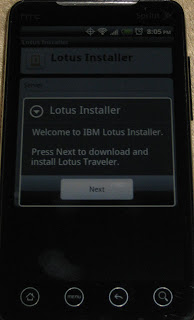


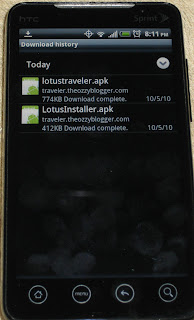


First, install Lotus Domino 8.5.2 and configure the server ( consider using 'More name variations with lower security' on the traveler server, I ran into some issues logging in using 'Fewer name variations with higher security'). Next install traveler 8.5.2. Next shut down Lotus Domino and install the Android traveler beta ( I am using code drop 1 ) by unpacking the files and copying them to the correct location according to the readme.txt:
The following files are copied from the zip to the domino server:
readme.txt
domino/html/traveler/LotusInstaller/LotusInstall.apk
domino/html/traveler/LotusTraveler/android/LotusTraveler.apk
traveler/cfg/client/VersionInfoExt.txt
Next append the text in versioninfoex.txt to versioninfo.txt file under /traveler/cfg/client/.
Start Lotus Domino.
First we need to download the Lotus Installer software on the Android device.
Note: traveler.theozzyblogger.com url will not work because I used it as an internal server and domain.
Go to the browser and type http://servername.com/servlet/traveler
Next Click on 'Configure your Android'

Next click on 'Menu' -> 'More' -> Downloads


Click on the LotusInstaller.apk to launch

If you do not have allow installation of application from unknown sources, you will get the following screen. Click Ok

Next check the Unknown sources and click ok to the popup message


Now go back to the downloads page and click on the LotusInstaller.apk again

Next click Install

Then you will see the Application installed. Click 'Open'

On the next screen, click 'Agree'

Next click 'Next'

Next input the traveler server name and user name and password and click 'Next'

Next there is a screen that says 'preparing to download'

However, this will never complete and the android traveler install will never download. So to get around this you have to hit the back button and open the browser and launch the apk installer from the browser url to download it. The url is:
http://servername.com/traveler/LotusTraveler/android/LotusTraveler.apk

Once downloaded, click on 'Menu' -> 'More' -> 'Downloads'. Next click on LotusTraveler.apk to install.

Click 'Install'

Click 'Open'

Input the user name, password, and traveler server name ( I had an issue with user name ozzy blogger, the keyboard does not allow a space but puts an underscore. I had to change the server security to more name variations and used the short name ozzyblogger ) Click 'Next'

Since I do not want my contact from Lotus Notes to be added to my phone, I uncheck Sync Contacts. Click 'Finish'

Click 'Ok'
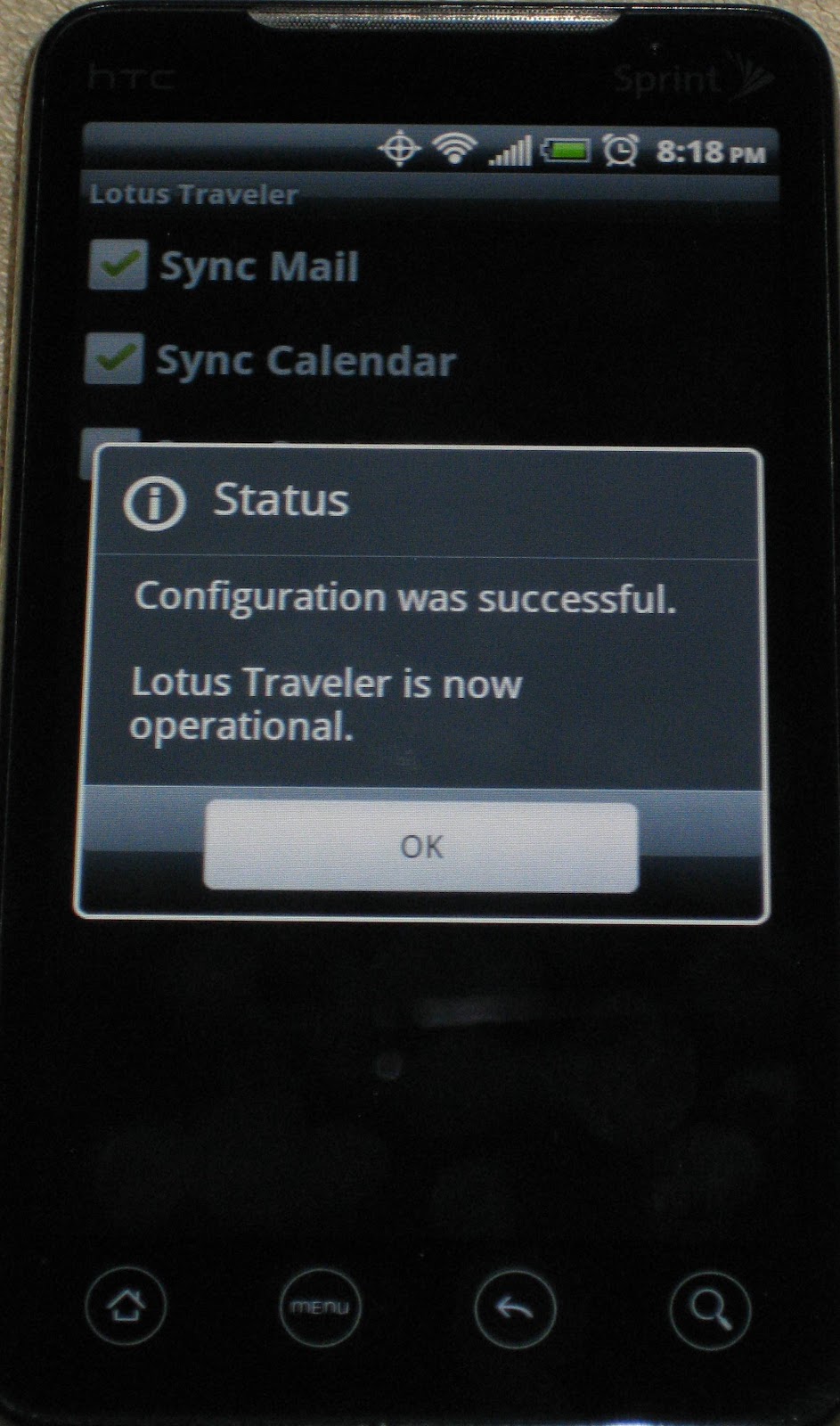
And that is it, the android beta traveler is running on Lotus Domino 8.5.2.
Tuesday, August 3, 2010
Lotus Traveler for 8.5.2 beta - update
So far I have been pleased with the traveler beta for Android. About once a week I receive an exception error and traveler will close unexpectedly but a restart of the phone fixes it. Other issues I have found:
1. Sometimes an email will be stuck in the notification bar even after I've selected it and viewed it. restart fixes this
2. Unread marks do not always sync as fast I want them to. Read messages on traveler take some time to reflect read on my notes client
3. Still see some phantom contact syncing, it's not consistent, but I have this turned off and I should not have Lotus Notes contacts in my phone. There might be a residual issue with my first traveler install and contact syncing was turned on
4. The download button that will download a full message ( you can set traveler to only download a specific size of the message or a truncated message ) doesn't aways work. Seems to work very well with only text emails
5. I wish they would use tables to prevent some emails from scrolling way off the right side of the screen. It's hard to read an email that you have to scroll to the right to read.
6. So far no issues with Android Froyo 2.2 release and my version of traveler beta.
Things I love about Android traveler is the fast sync when a new message comes in. The notifications of unread email is very accurate.
According to Ed Brill, the Android release of Traveler will not make the 8.5.2 release :(
http://www.edbrill.com/ebrill/edbrill.nsf/dx/lotus-notes-traveler-for-android-beta-some-clarifications
1. Sometimes an email will be stuck in the notification bar even after I've selected it and viewed it. restart fixes this
2. Unread marks do not always sync as fast I want them to. Read messages on traveler take some time to reflect read on my notes client
3. Still see some phantom contact syncing, it's not consistent, but I have this turned off and I should not have Lotus Notes contacts in my phone. There might be a residual issue with my first traveler install and contact syncing was turned on
4. The download button that will download a full message ( you can set traveler to only download a specific size of the message or a truncated message ) doesn't aways work. Seems to work very well with only text emails
5. I wish they would use tables to prevent some emails from scrolling way off the right side of the screen. It's hard to read an email that you have to scroll to the right to read.
6. So far no issues with Android Froyo 2.2 release and my version of traveler beta.
Things I love about Android traveler is the fast sync when a new message comes in. The notifications of unread email is very accurate.
According to Ed Brill, the Android release of Traveler will not make the 8.5.2 release :(
http://www.edbrill.com/ebrill/edbrill.nsf/dx/lotus-notes-traveler-for-android-beta-some-clarifications
Wednesday, July 21, 2010
Traveler for Android ( 8.5.2 beta ) - Update
I installed the Traveler Android beta client again on Saturday night and I haven't had issues with it. I think the issue might have been me terminating the app using a task killer app but I don't know. In viewing the log it is connecting to the server about every 10 minutes.
Friday, July 16, 2010
Traveler for Android ( 8.5.2 beta ) - Update
Today I noticed that my phone didn't charge completely over night and it was warm to the touch all day. After loading OS Mon I found the Traveler task using 70% of the cpu! I think something got corrupted because I stopped receiving email alerts through Traveler. I checked the log and it seems that traveler was checking the server every few seconds ( not sure if this is normal ) I uninstalled the traveler app and installer and it is back to normal. I will re-install on Monday.
Subscribe to:
Posts (Atom)